


If 2024 was the year the legal world met the chatbot, 2026 is the year we start firing them.
Not because they don’t work, but because they’ve reached their ceiling. You know the drill: you open a chat window, you copy-paste a clause, you ask it to "make this sound less aggressive," and you wait for a response. It’s a better way to draft, sure. But it’s still you doing all the heavy lifting. You are the project manager, the data entry clerk, and the quality control officer. The AI is just a fancy typewriter with a search engine attached.
Welcome to the era of the AI Assistant.
The shift from simple Large Language Model (LLM) chatbots to "Agentic AI" is the single biggest leap in legal tech since the transition from paper to PDF. We are moving away from reactive tools that answer questions and toward proactive systems that support legal workflows, surface relevant information, and propose next steps for human review.
At TemplateVault Legal, we’ve been watching this shift closely. Because here’s the truth no one tells you: an AI assistant is only as useful as the data it can access. If your firm’s knowledge is scattered across Outlook, local drives, and five different versions of a "Standard NDA," your assistant is effectively working without enough context.
Let’s break down why simple "chatting" is no longer enough, and why assisted, human-reviewed execution is the future of the legal industry.
Chatbots vs. Assistants: The Difference Between a Tool and a Workflow Partner
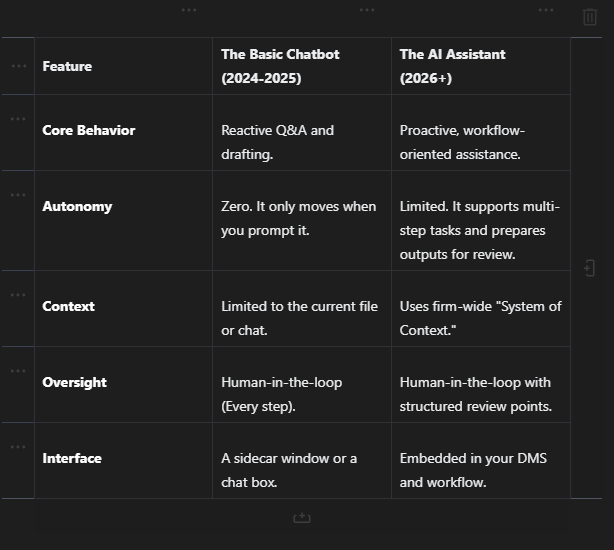
Most legal teams are still using Chatbot-style GenAI. It’s reactive. You give it a prompt, it gives you a response.
AI assistants are goal-oriented, but still designed for human oversight. You give them an objective, "Monitor this portfolio for renewal dates and prepare the necessary extensions using our 2026 preferred terms", and the system determines which tools to use, which documents to reference, and when to bring recommended outputs to you for approval.
The "Drowning in Prompting" Problem
The biggest bottleneck with chatbots is the lawyer. To get anything done, you have to spend your valuable time engineering the perfect prompt. If you have to spend 15 minutes explaining a matter to a chatbot just to get a 5-minute drafting task done, the ROI is questionable at best.
An AI assistant already understands more of the matter context. It can access your secure template vault, your previous filings, and your firm’s "gold standard" clauses. Instead of waiting for repetitive prompts, it can prepare relevant suggestions and materials for your review.
Why Your Firm Needs a "Neural Network," Not a Folder
For decades, we’ve organized law firms like filing cabinets. Client > Matter > Year > Correspondence. This hierarchy was designed for human eyes to browse, but it's a prison for AI.
When you move to agentic workflows, you need a Legal Context Graph. This is where TemplateVault Legal comes in. Instead of just storing files, our platform structures your data so an AI assistant can understand the relationships between them.

An assistant doesn't care that a document is in folder "2023-Contracts." It cares that it’s a Vendor Agreement with a Net-30 payment term and a unilateral termination clause that deviates from the firm’s standard. When your templates are organized in TemplateVault with semantic tags and metadata, your AI tools can finally "see" the patterns and bring them forward for review.
The Three Stages of the Agentic Law Firm
How does this actually look in practice? Most firms will transition through these three stages over the next 18 months:
1. The Super-Searcher
Instead of looking for "that one NDA we did for the tech client last July," you ask your agent to "Find all agreements from the last two years where we conceded on the indemnity cap." Because TemplateVault has already indexed and tagged those documents, the agent finds them in seconds.
2. The Workflow Orchestrator
This is where the magic happens. Your assistant monitors an incoming email, identifies it as a request for a lease extension, pulls the original lease from your vault, prepares an extension using your latest templates, and pings you in Slack: "Draft ready for review. It matches our 2026 standards with one minor deviation in Section 4."
3. The Proactive Auditor
The assistant proactively scans your document library for potential issues. It notices that a new Supreme Court ruling may affect a specific "Choice of Law" clause in your templates. It flags the 45 active matters that may be affected, surfaces the relevant documents, and proposes next-step updates for attorney review while you’re still reading the news.
The Cost of Staying with "Status Quo"
We’ve all heard the "AI is taking our jobs" alarmism. The reality is much more mundane but equally dangerous: Inefficiency is taking your profits.
Recent data shows that solo and small firms lose an average of $47,000 per year simply due to "document chaos", the time spent searching for files, fixing version control errors, and re-drafting things that have already been written.

When you stick to basic chatbots, you’re still paying that "chaos tax." You’re just paying it faster. To truly reclaim those billable hours, you need a system that doesn't just help you write, it helps you manage and review work more efficiently.
Security: The "Human-in-the-Loop" Model
The biggest hurdle for AI adoption isn't technology; it's trust. At TemplateVault Legal, we know that "Agentic" should not mean "Unsupervised."
We advocate for the Human-in-the-Loop model. The assistant handles the grunt work, but a qualified attorney remains the final gatekeeper. Every draft, every search, and every workflow supported by AI is logged, auditable, and requires human review before it leaves the firm.
Our Security First approach ensures that your firm’s intelligence stays within your walls. We don't train public models on your private documents. Your vault is yours.
Setting Up Your "Data Engine"
If you want to move beyond the chatbot plateau, you have to start with your foundation. You can't build a skyscraper on a swamp, and you can't build an effective AI-assisted law firm on a messy SharePoint drive.
Step 1: Centralize. Get every "gold standard" template into one secure location.
Step 2: Structure. Use TemplateVault's custom tagging to give your documents context.
Step 3: Deploy. Connect your AI tools to your vault and let your assistant start surfacing useful suggestions, drafts, and review-ready workflows.
Conclusion: Stop Chatting, Start Doing
The legal industry is notorious for being "late to the party," but the shift to AI-assisted workflows is moving too fast to ignore. Those who continue to treat AI as a "Google Search for their own files" will quickly find themselves outpaced by firms that have deployed structured, human-reviewed assistants.
Your firm’s knowledge is its most valuable asset. Stop burying it in folders and start powering it with a vault designed for the future.
Ready to build your firm's second brain? Start your free trial of TemplateVault Legal today. No credit card required. No legacy headaches. Just pure productivity.
Frequently Asked Questions
Is Agentic AI different from ChatGPT?
Yes. Think of ChatGPT as a very smart intern who waits for you to tell them what to do. Agentic AI is closer to an assistant that can use specific tools, firm knowledge, and workflow logic to prepare next steps for your review.
Do I need a huge IT team to set this up?
Not with TemplateVault Legal. We designed our platform for solo practitioners and small-to-midsize firms. You can be up and running: with your templates organized and searchable: in under an afternoon. Check out our simple pricing plans to see which fits your firm.
Will AI replace junior associates?
It can reduce the work that junior associates usually hate: manual tagging, basic drafting prep, and endless searching. That allows your team to focus more on high-value strategy, legal analysis, and client relationships, while keeping attorneys in control of final decisions.
Is my data safe if I use AI assistants?
Security is our top priority. TemplateVault Legal uses end-to-end encryption and role-based permissions. When you integrate AI, it only accesses the context you've explicitly allowed within your secure vault. Learn more on our Security page.
TemplateVault Legal is a document management platform and drafting aid. It does not provide legal advice, practice law, or replace the professional judgment of a qualified attorney.
