

Choosing the right document management system (DMS) is one of the most critical operational decisions a law firm can make. For many years, the "default" choice has been Microsoft SharePoint. After all, if you’re already paying for Microsoft 365, SharePoint is "free," right?
But as many solo practitioners and growing legal teams have discovered, "free" often comes with a hidden cost: hundreds of lost billable hours spent wrestling with a system that wasn’t built for the law.
In the battle of SharePoint vs. TemplateVault, the choice isn't just about where you store your files, it's about how you manage your firm's collective intelligence. In this guide, we’ll break down why generic storage often fails legal professionals and why a purpose-built solution like TemplateVault Legal is becoming the gold standard for modern law firms.
The SharePoint Trap: Why Generic Isn't Always Better
SharePoint is a powerful tool. It’s excellent for corporate intranets, massive enterprise data storage, and general file sharing. However, it was designed to serve everyone from construction companies to retail chains. It wasn't designed for the unique, template-heavy workflow of an attorney.
1. The "Folder Hell" Phenomenon
In SharePoint, organization usually relies on a nested folder structure. Over time, these folders become a labyrinth. You find yourself clicking through Client Name > Matter > 2024 > Correspondence > Drafts > Old Versions just to find a standard NDA.
Because SharePoint lacks a dedicated legal taxonomy, every attorney in the firm likely organizes their folders differently. This leads to "knowledge silos" where only the person who created the file knows where it actually lives.
2. Search that Doesn't "Speak" Legal
SharePoint’s search is broad. If you search for "Indemnity Clause," you might get 500 results, including every email, spreadsheet, and draft document that mentions the word. For a lawyer, this is noise. You need the one specific, firm-approved indemnity clause that you used for that high-stakes tech merger last month.
3. The Hidden IT Burden
To make SharePoint work like a true legal DMS, you usually need to hire a consultant to set up custom metadata, "matter-centric" views, and complex permission sets. Without this expensive custom work, SharePoint remains just a sophisticated "file dump."
TemplateVault Legal: Purpose-Built for the Way You Work
At TemplateVault Legal, we didn’t set out to build a general storage tool. We built a secure, intelligent repository designed to solve the specific pains of legal drafting and template management.

1. Instant Retrieval (85% Faster Search)
While SharePoint forces you to dig through folders, TemplateVault uses an intelligent search engine that understands legal documents. By using custom tags, filenames, and full-text content indexing, our users report an average 85% reduction in template search time.
Instead of spending 20 minutes looking for a specific pleading, you find it in 30 seconds. That’s an average of 12 hours saved per week for the typical attorney.
2. A Centralized Knowledge Base
TemplateVault moves your firm away from "email-based knowledge sharing." You no longer have to email a senior associate to ask, "Do you have a good template for a motion to dismiss in a maritime case?"
Everything is centralized. Your firm’s best work product is stored, tagged, and ready for reuse. This is especially critical for onboarding new associates, they have instant access to the firm’s "gold standard" documents without needing a guided tour of a messy server.
Security: Bank-Grade vs. "Good Enough"
In the legal world, security isn't a feature, it's a professional obligation. While SharePoint offers standard cloud security, it often requires manual configuration to ensure "ethical walls" and granular permissions are correctly applied.

TemplateVault Legal provides enterprise-grade encryption out of the box.
We use bank-grade encryption to ensure that your firm’s most sensitive templates and work products are protected at all times. Our platform includes:
- Role-Based Permissions: Easily set who can view, edit, or delete templates (Admins, Editors, Viewers).
- Complete Version History: Never worry about an associate overwriting a master template. You can roll back to any previous version with a single click.
- Centralized Control: Prevent the risk of valuable templates living on individual laptops or unencrypted USB drives.
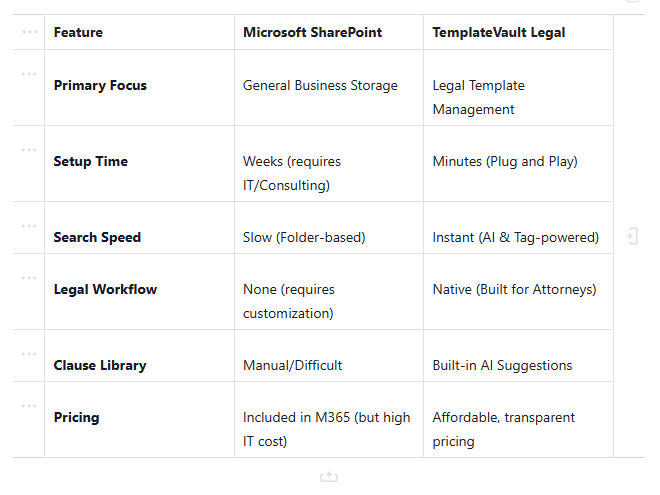
Comparison at a Glance: SharePoint vs. TemplateVault
Stop Searching. Start Drafting.
The goal of a DMS isn't just to store documents, it's to make you a more efficient lawyer. If you are a solo practitioner or a small firm, you don't have the time to be your own IT director. You need a system that works the moment you log in.

When you choose TemplateVault Legal, you aren't just buying software; you are investing in your firm’s productivity. By centralizing your knowledge, you ensure consistency across all your filings, reduce drafting errors, and free up time to focus on what matters most: your clients.
Special Offer: The Freedom Campaign
We believe every law firm should have the freedom to work efficiently without being bogged down by complex, generic software. As part of our Freedom Campaign, we are offering a special discount for new users.
Use code: FREEDOMONTH at checkout to receive a discount on your subscription. Experience the best document management for lawyers without the SharePoint headache.
Frequently Asked Questions
Is TemplateVault Legal a replacement for SharePoint?
For many firms, yes. While you might still use SharePoint for general internal files (like HR manuals or office photos), TemplateVault Legal becomes the "System of Record" for your actual legal work product, templates, and clauses.
How long does it take to get started?
Unlike traditional legal DMS systems that take weeks to implement, you can set up your TemplateVault account in under five minutes. Our bulk upload feature allows you to migrate your existing templates instantly.
Is it secure enough for my firm?
Absolutely. We use bank-grade encryption and secure cloud hosting to ensure your data is safer than it would be on a local server or a generic cloud drive. You can learn more on our Security Page.
Conclusion: The Verdict
If you have the budget for a full-time IT staff and a desire to build a custom system from scratch, SharePoint can be made to work. But if you want a platform that understands what an NDA is, how a motion should be tagged, and how to find a specific clause in seconds, TemplateVault Legal is the clear winner.
Don't let your firm's knowledge get lost in a sea of blue folders. Join the hundreds of legal professionals who have reclaimed their billable hours.
Ready to see the difference?
Explore TemplateVault Legal features and start your free trial today. Stop rewriting from scratch and start drafting with confidence.
